Recruiteware
An office CRM for Thomas Grant and Apex that helped consultants search candidates, manage compliance and work with bookings on the existing recruitment system, while creating a shared product foundation for public applications and future candidate self-service.
2025
On an established backend
The design challenge was deciding what to preserve, what to replace, and how three audiences could share one system.
Recruitment consultants were running healthcare workflows through an office system shaped around older logistics processes. I designed a new interface on top of the existing backend, creating a clearer consultant experience while establishing a foundation that public applications and future candidate self-service could share. Where the backend already represented real operational states, I kept that model in the new interface.
Initial proposal
Host a new front on WordPress, follow an existing layout, and spend the first 2.5 months mostly on look and feel, with some front-end behaviour added on top of the current system.
Discovery
There were three audiences on one recruitment operation: applicants on the public site, consultants in the office, and candidates who had no surface yet. Apex asked when they could have the CRM to organise candidates. Public registration lived in WordPress form builders — one live form could only email details, so tests never reached the database. The office already had a dashboard spec for last-week versus this-week bookings by client. The candidate portal was in the brief and did not exist yet.
Product response
I treated those three experiences as parts of one product system, and proposed an interface layer on the existing RecruitWare processing so they could share APIs later. Validation, scheduled jobs, payroll and reports stayed where they already ran. The office product was designed around consultant work — pipeline, candidate status, compliance — and built in that order. Fungai stayed on the APIs. I designed and built the office interface.
The office product.
The office product, then the surfaces that still had to join it.
Built at Greyzip with Fungai Motezu on the RecruitWare APIs, July to September 2025. The live product is the office CRM and public registration into that system. Candidate self-service was in the brief and is out of scope here.
Problem
Apex asked when they could have the CRM to organise candidates. The office product had to use the existing RecruitWare identity, so consultants were not given a second account. Wrong credentials returned the HTML login page. Right credentials returned a 404 — the login succeeded, the handoff into the new interface did not.
Solution
The new office interface follows that existing login, keeps the session, then lands consultants in role-gated modules. Logout uses the same session. Consultants, compliance and admins see different slices of the same records. The wiring that made this possible — following the Notes redirect and keeping the session cookie — is in Design to code.
Before
- Successful login dropped consultants out of the new interface
- Identity lived in the existing CRM session
- No candidate login
After
- Consultants enter through the login they already had
- Role-gated navigation once they are in
- Candidate access left for a later surface
Problem
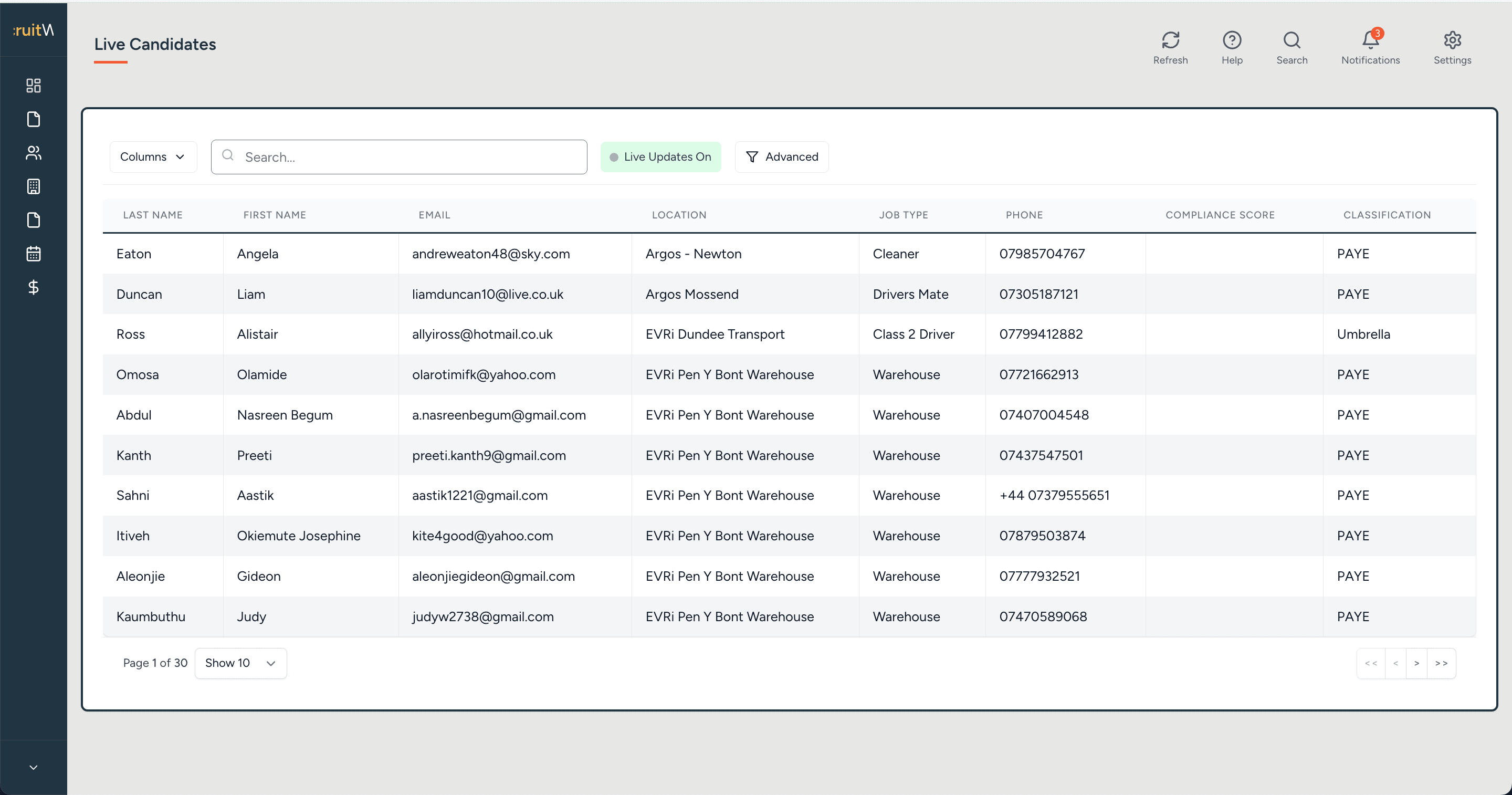
Consultants already worked in those operational states. The previous office view made the lists hard to search and scan, and an early live connection only showed Live Candidates whichever view was requested. Those states came from the existing backend, including the Notes and menu configuration.
Solution
I retained the status split and redesigned search, columns, filters and a visible live-updates state. Tables were designed against fixture data first, then connected to live views. The navigation reads the existing menu configuration — including malformed prefixes — so the interface stays truthful to the operational model.
Before
- Status lists that were hard to search and scan
- Each section as a separate office page
- An early live view that only returned Live Candidates
After
- The same status split, with search, columns and filters
- A visible Live Updates state
- Navigation driven by the existing operational menu
Problem
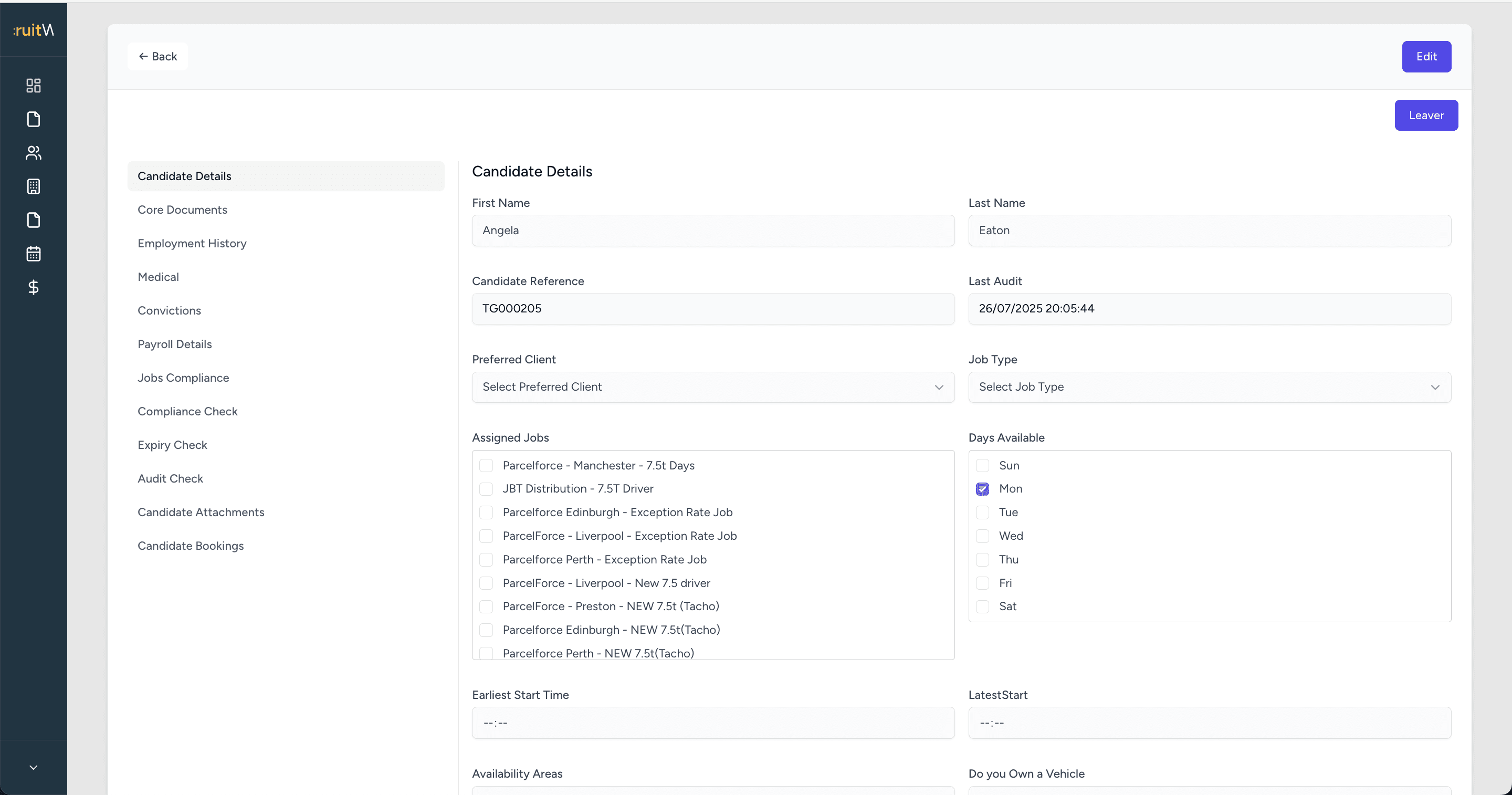
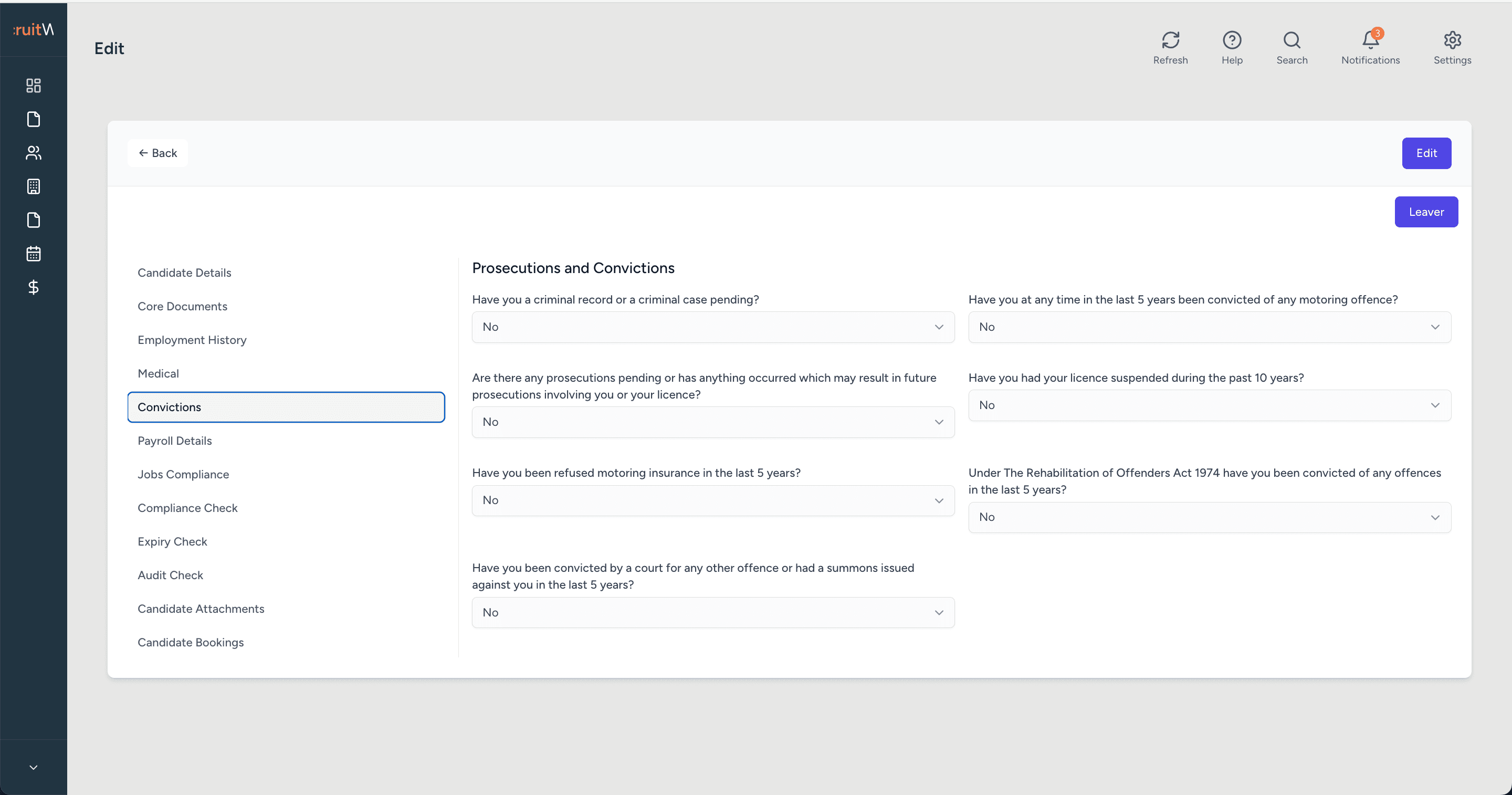
Profiles were still shaped for warehouse and driving. Healthcare work needed compliance, attachments and auditing on the same candidate. Labels and tabs had to be authored in the interface; fields and actions still come from the current form API.
Solution
A single candidate with inner navigation: details, core documents, employment history, medical, convictions, payroll, jobs compliance, compliance check, expiry check, audit check, attachments and bookings. Edit and leaver stay on the record. Availability, preferred client and assigned jobs stay visible next to the compliance tabs.
Before
- Warehouse and driving fields as the default profile
- Compliance easy to miss beside the everyday record
- Audit timestamp away from the details view
After
- Healthcare and logistics fields on the same candidate
- Convictions, medical and expiry as first-class tabs
- Last audit shown on the details view
Problem
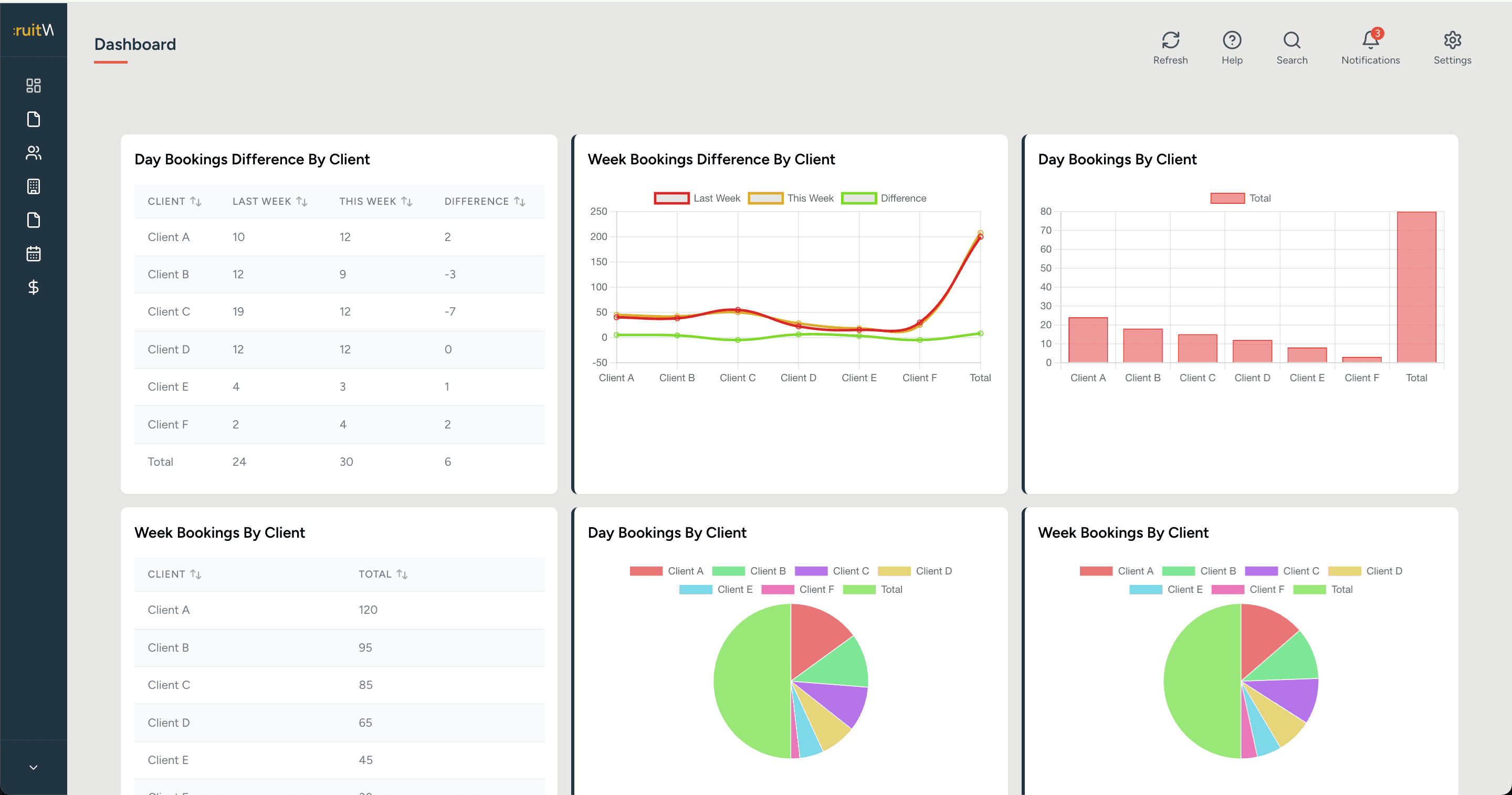
Booking volume lived in background reports. A dashboard spec already asked for last-week versus this-week counts by client. The backend could describe chart type, labels, data and order. The office did not yet show them.
Solution
The dashboard became the first office screen. Graphs were proven on fixture data, then pointed at live bookings. Finance and weekend costings stay as sibling areas in the chrome.
Before
- Report generation buried in background processing
- A dashboard spec with no office screen to render it
After
- Dashboard as the first office destination
- Day and week bookings by client, including the weekly difference
- Charts following the spec the backend already described
Problem
Those records already existed in the backend. The menu listed All Clients, Contacts and Jobs beside candidates. Booking and availability still depended on knowing the previous office screens, because there was no consistent table for browsing them.
Solution
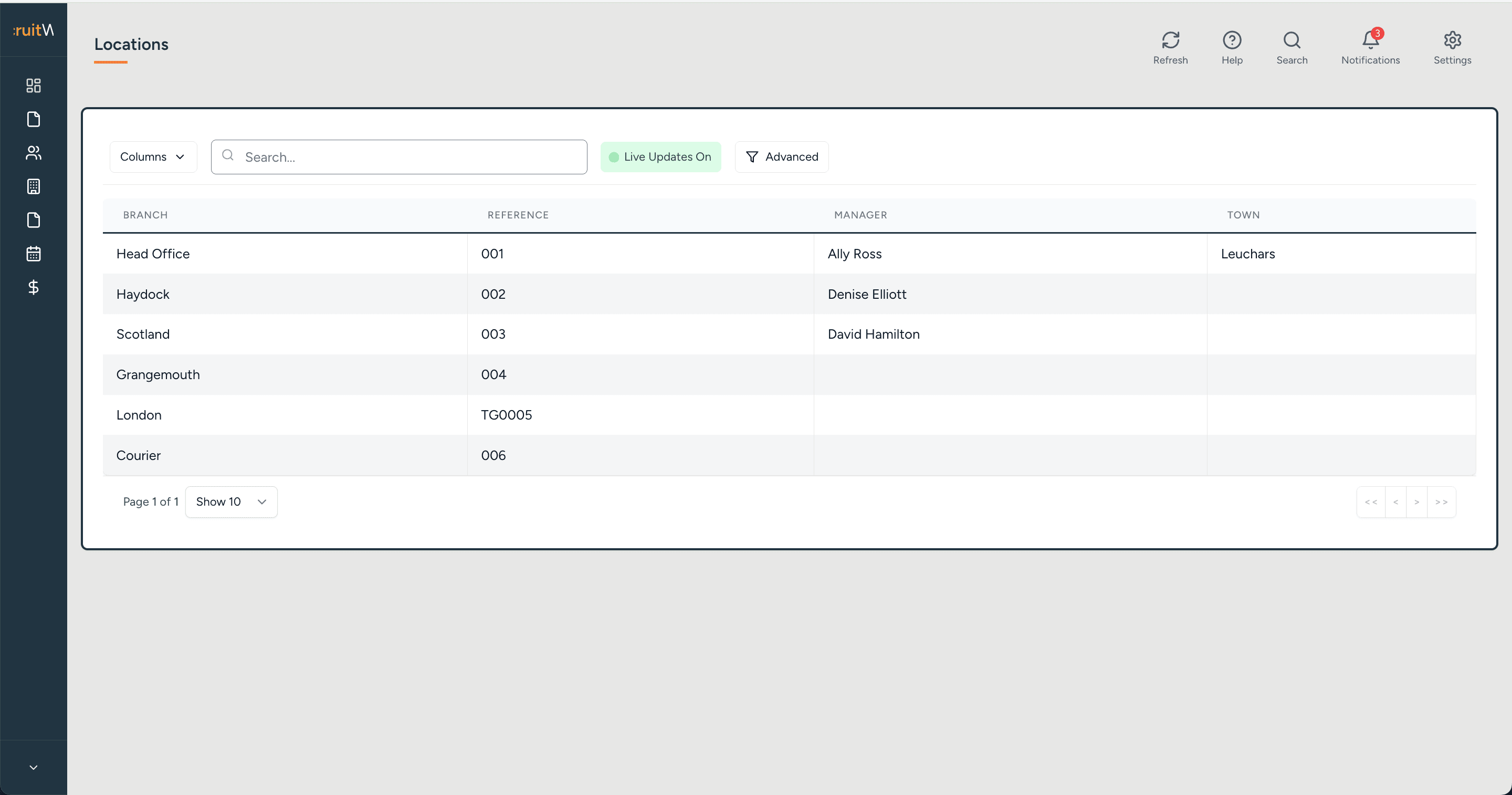
Locations as a live table — branch, reference, manager, town — with the same search and columns as candidates. Clients and jobs stay in the same sidebar because that is how the backend already grouped them.
Before
- Locations only reachable through the previous office screens
- No shared table pattern across candidates and branches
After
- Locations list with live updates
- Clients and jobs as sibling modules
- Branch references such as TG0005 kept from the existing data
Problem
Apex and Thomas Grant already had registration and DBS forms on the public site. One live plugin could only email details, so tests never reached the database. Apex’s requirement was that candidates could complete the pack and the office could see the data. The CRM expected field names — identity, next of kin, employment history, medical, DBS, GDPR — that had to match exactly or someone would map them by hand.
Solution
Greyzip restored the Avada forms so entries stayed on the site and could be linked. Field names were set to the CRM placeholders. The pack was split into sections with a next step, because a single page could not hold it. Signature pages became documents the applicant ticks to confirm.
Before
- Multiple form builders on the same site
- A live path that only emailed the office
- Field names that would have needed manual matching
After
- Avada live again, with CRM field names
- Stored entries as a fallback when the live write fails
- A multi-section pack, with policy documents ticked
Problem
Candidates had no access to the system. The intended loop was: register on the website, get a profile in the CRM, then use a later surface for profile, documents and booking info. Whether uploads happened at registration or after vetting was still being decided.
Solution
The office product shipped first. The interface layer was shaped so a later portal could read the same profile and booking data. That surface is out of scope for this case study.
Before
- No candidate login
- Documents and availability handled inside the office only
After
- Office CRM shipped first
- Shared APIs left ready for a later portal
- No candidate-facing screens presented as finished
04 / Deep dives
Three decisions that shaped the office product
The visible interface needed replacing. The backend still held years of working recruitment logic. The work that mattered was deciding what to keep, how an application becomes a candidate, and how consultants already organised their day.
Keep the backend, replace the office
Problem
The first hosting idea was WordPress, because that is where the public site already lived. The office UI was already PHP templates on that stack. The backend still ran validation, scheduled work, payroll and reports. A visual refresh on the same shell would have left website, office and a later portal as separate experiences on top of that processing.
Contribution
I asked whether we were working on the candidate portal or the office system, then proposed an interface layer that could share APIs later, without rebuilding the processing Fungai already ran. In July I designed the dashboard against the existing booking spec on fixture data, so we could agree the office destination before login was wired. Fungai stayed on the APIs while Greyzip took the office front.
Constraints
- Do not re-do background processing, validation, scheduled tasks or report generation.
- The existing database and session model had to keep working.
- The dashboard API would indicate chart type, labels, data and order — the front had to render whatever that described.
- First phase ran July to September 2025.
Keep the processing, replace the office shell
The new interface sits in front of the existing RecruitWare work. Payroll and reports stay where they already run.
Prove the dashboard before the session works
Graphs on fixture data meant we could agree layout without waiting on login. The live dashboard is that spec: last-week versus this-week bookings by client.
Read the existing views before drawing new ones
Fungai sent the PHP candidates view and the view process — type, URL, columns, query, return list, then per-user settings. The Live / Pending / Compliance split in the new UI is that view.
Office dashboard. Last-week versus this-week bookings by client, on the existing backend.
Outcome
The office CRM shipped on DigitalOcean as an interface layer on the existing backend. Website, office and a later portal can share that processing. The stack is in Design to code.
05 / Design to code
Working against the system that already existed
Owning both the interface and its implementation meant consultant workflows could be tested against the behaviour of the real RecruitWare system as they were designed. The existing shell taught the data model: cookie session, Notes views, settings-driven columns, a menu string.
Follow the Notes login, keep the cookie and folder
Consultants kept the identity they already used. An external authentication guard with session sync keeps RecruitWare as the source of who someone is. A 404 after good credentials was the redirect, not a failed password.
Let the API describe the chart, then render it
The office already expected last-week versus this-week bookings by client. Chart type, labels, data and order come from the backend so the dashboard can change without a front-end rewrite. Dummy data proved the graphs; live data replaced them.
Author tabs, bind fields
Candidate form labels and tabs sit in the interface so consultants recognise the current pack. Data and buttons arrive on an API call and submit back. Healthcare fields can grow on that record.
- Laravel 11
- PHP
- React
- Inertia.js
- Tailwind CSS
- MySQL
- Chart.js
- DigitalOcean
06 / Outcome and status
Where the product stands
The office could move onto a purpose-built recruitment interface without replacing the backend responsible for existing reporting and operational processes. Public registration was aligned so an application could become a candidate record the office can see. Candidate self-service was in the original brief and remains unshipped.
Evidence
- Shipped: consultant access, candidate statuses, profiles, compliance fields, booking dashboard, locations, and public registration into the CRM.
- Observed: the office app is live on DigitalOcean, behind the existing RecruitWare login, available on request.
- Design evidence: Live / Pending / Compliance / Audit / Leavers / Archive retained as the consultant model, with search, columns and live updates.
- Launch architecture: an interface layer on the existing processing. Laravel, React and Inertia are in Design to code.
Evidence boundary
Post-handover analytics were not available to me, so I do not attribute speed, conversion or time-saved figures to the work.
Product boundary
The shipped service is the consultant office product and public intake into that CRM. Candidate self-service for profile, documents, availability and bookings was prepared for in the architecture and is not part of the delivered product. If that surface became the next priority, it should use the shared APIs.
Reflection
The visible interface needed replacing. The backend still held years of working recruitment logic. Given the same brief I would still keep that processing and redesign the office on top of it. The distinction is knowing that an office product for consultants is not the same as a finished three-audience system.